 Hacktoberfest is here! Contribute, collaborate & earn rewards.


Mattermost 테마 커스터마이징#


Mattermost 사용자 인터페이스의 색상을 커스터마이징할 수 있습니다. Mattermost에서 디자인한 5가지 표준 테마 중에서 선택하거나 자신만의 커스텀 테마를 디자인할 수 있습니다. 테마 변경사항은 귀하가 속한 모든 팀에 적용되며 모든 Mattermost 클라이언트에서 볼 수 있습니다. Mattermost Enterprise 고객은 소속된 각 팀마다 다른 테마를 구성할 수 있습니다.
설정  아이콘을 선택한 다음 표시 > 테마 로 이동하세요. Mattermost 팀이 디자인한 5가지 표준 테마 중에서 선택하려면 테마 색상 을 선택하세요.
표준 테마를 더욱 커스터마이징하여 진정한 나만의 테마를 만들 수 있습니다. 표준 테마를 선택한 후 커스텀 테마 를 선택하고 선호도에 따라 색상 선택을 수정하세요. 구성 가능한 항목을 알아보려면 커스텀 테마 문서를 참조하고, 영감을 얻으려면 커스텀 테마 예시 문서를 확인하세요.
5가지 표준 Mattermost 테마 중 하나를 선택하려면 테마 를 탭하세요.
참고
웹 브라우저나 데스크톱 앱에서 Mattermost를 사용하여 커스텀 테마를 정의할 수 있습니다.
커스텀 테마#
커스텀 테마 를 선택한 다음 사이드바 스타일, 중앙 채널 스타일, 그리고 링크 및 버튼 스타일 옵션을 확장하여 배경, 링크, 텍스트, 테두리와 같은 개별 인터페이스 색상을 커스터마이징하세요.
커스텀 테마 변경사항은 변경하는 대로 Mattermost에 적용됩니다. 테마 변경사항을 확인하려면 저장 을 선택하세요. 표시 설정 창을 종료하고 예, 삭제 를 선택하여 변경사항을 취소할 수 있습니다.
커스텀 테마 예시#
테마 색상을 커스터마이징하고 입력 상자에 테마 값을 복사하여 붙여넣어 다른 사람과 공유하세요. 아래는 해당 테마 값이 있는 예시 테마입니다.
Mattermost#
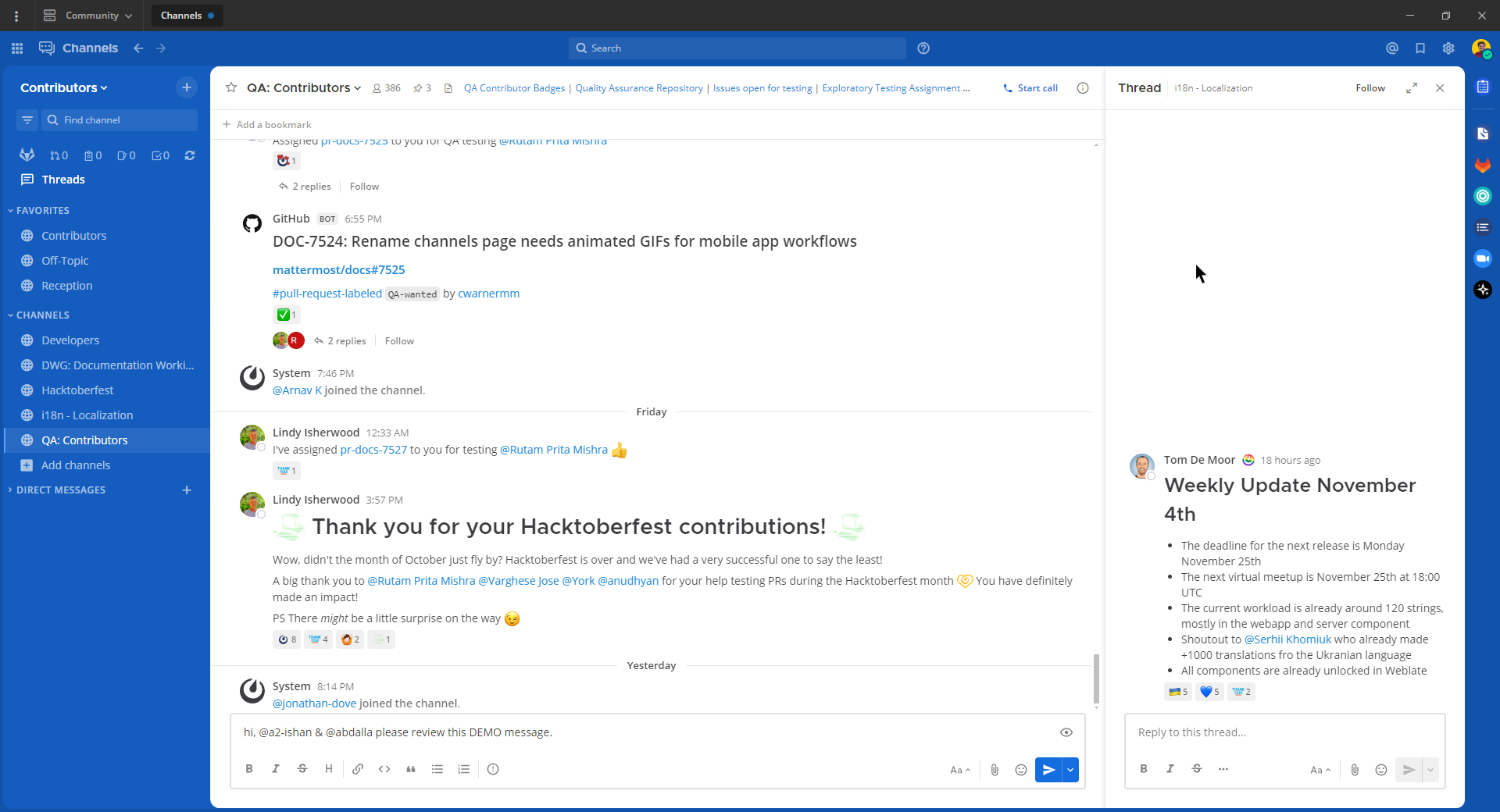
이 테마를 원하시나요? 다음 코드를 Mattermost에 복사하여 붙여넣으세요:
{"sidebarBg":"#145dbf","sidebarText":"#ffffff","sidebarUnreadText":"#ffffff","sidebarTextHoverBg":"#4578bf","sidebarTextActiveBorder":"#579eff","sidebarTextActiveColor":"#ffffff","sidebarHeaderBg":"#1153ab","sidebarTeamBarBg":"#0b428c","sidebarHeaderTextColor":"#ffffff","onlineIndicator":"#06d6a0","awayIndicator":"#ffbc42","dndIndicator":"#f74343","mentionBg":"#ffffff","mentionBj":"#ffffff","mentionColor":"#145dbf","centerChannelBg":"#ffffff","centerChannelColor":"#3d3c40","newMessageSeparator":"#ff8800","linkColor":"#2389d7","buttonBg":"#166de0","buttonColor":"#ffffff","errorTextColor":"#fd5960","mentionHighlightBg":"#ffe577","mentionHighlightLink":"#166de0","codeTheme":"github"}
조직#
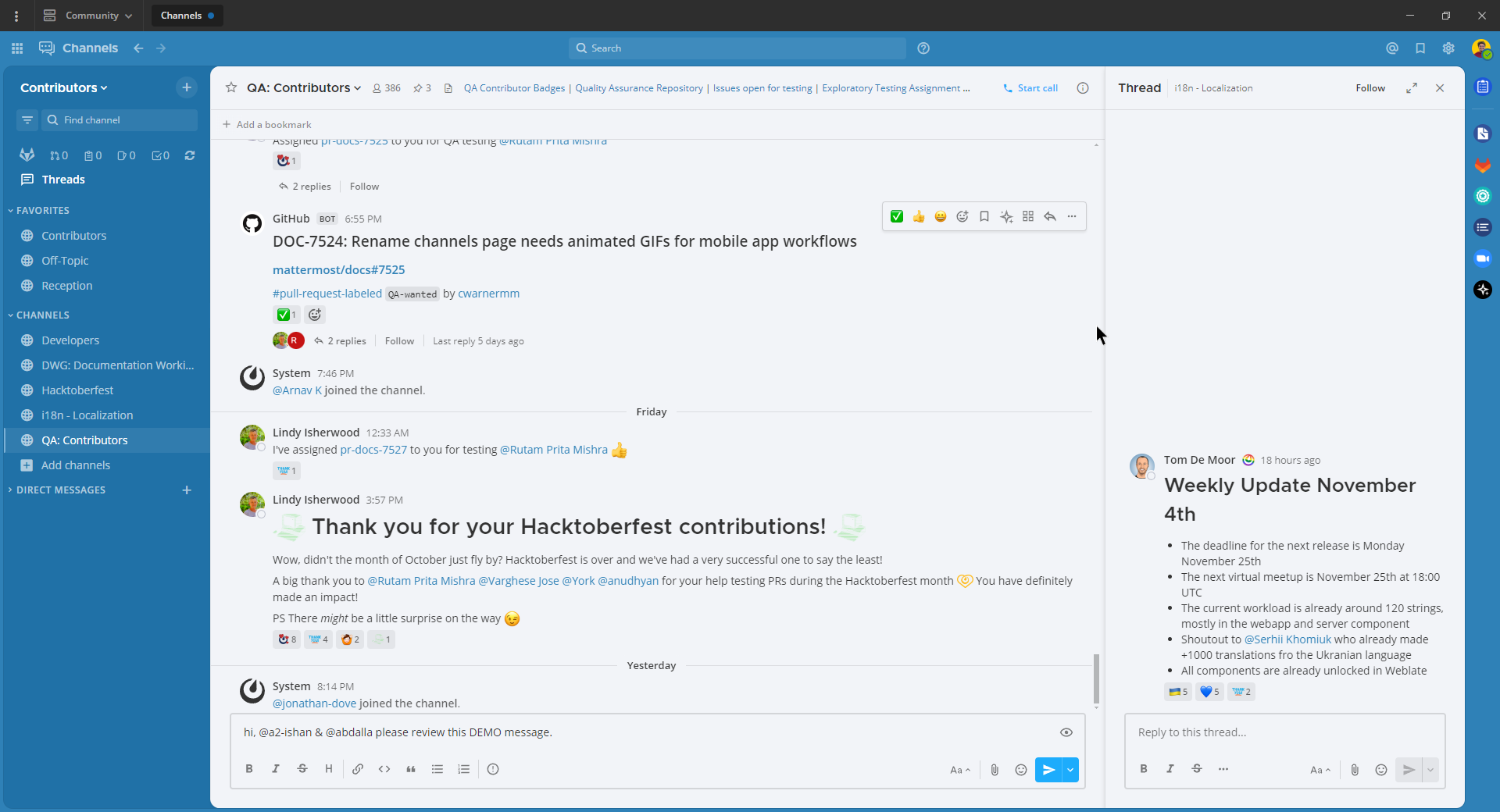
이 테마를 원하시나요? 다음 코드를 Mattermost에 복사하여 붙여넣으세요:
{"sidebarBg":"#2071a7","sidebarText":"#ffffff","sidebarUnreadText":"#ffffff","sidebarTextHoverBg":"#136197","sidebarTextActiveBorder":"#7ab0d6","sidebarTextActiveColor":"#ffffff","sidebarHeaderBg":"#2f81b7","sidebarTeamBarBg":"#256996","sidebarHeaderTextColor":"#ffffff","onlineIndicator":"#7dbe00","awayIndicator":"#dcbd4e","dndIndicator":"#ff6a6a","mentionBg":"#fbfbfb","mentionColor":"#2071f7","centerChannelBg":"#f2f4f8","centerChannelColor":"#333333","newMessageSeparator":"#ff8800","linkColor":"#2f81b7","buttonBg":"#1dacfc","buttonColor":"#ffffff","errorTextColor":"#a94442","mentionHighlightBg":"#f3e197","mentionHighlightLink":"#2f81b7","codeTheme":"github"}
Mattermost 다크#
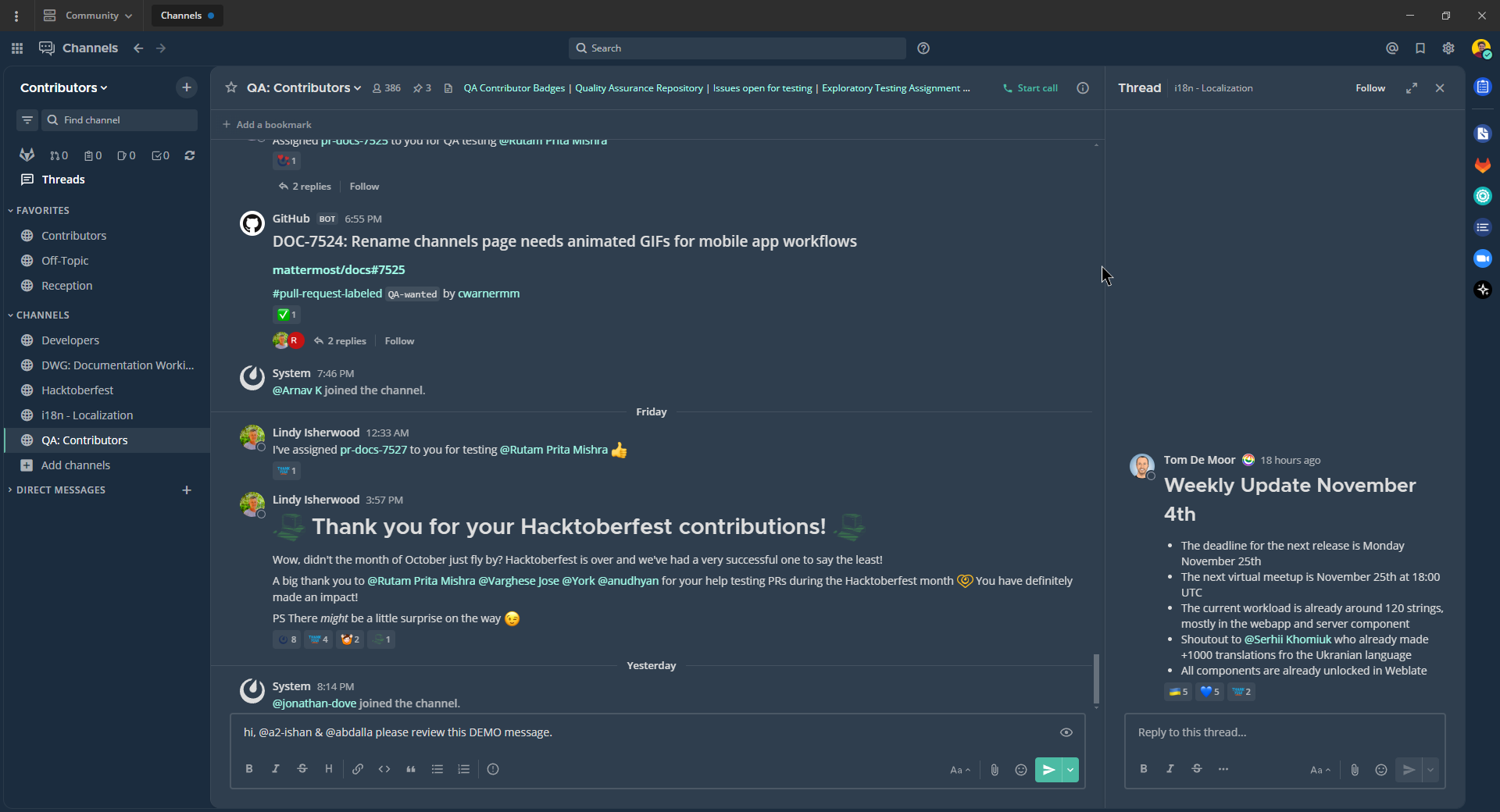
이 테마를 원하시나요? 다음 코드를 Mattermost에 복사하여 붙여넣으세요:
{"sidebarBg":"#1b2c3e","sidebarText":"#ffffff","sidebarUnreadText":"#ffffff","sidebarTextHoverBg":"#4a5664","sidebarTextActiveBorder":"#66b9a7","sidebarTextActiveColor":"#ffffff","sidebarHeaderBg":"#1b2c3e","sidebarTeamBarBg":"#152231","sidebarHeaderTextColor":"#ffffff","onlineIndicator":"#65dcc8","awayIndicator":"#c1b966","dndIndicator":"#e81023","mentionBg":"#b74a4a","mentionColor":"#ffffff","centerChannelBg":"#2f3e4e","centerChannelColor":"#dddddd","newMessageSeparator":"#5de5da","linkColor":"#a4ffeb","buttonBg":"#4cbba4","buttonColor":"#ffffff","errorTextColor":"#ff6461","mentionHighlightBg":"#984063","mentionHighlightLink":"#a4ffeb","codeTheme":"solarized-dark"}
Windows 다크#
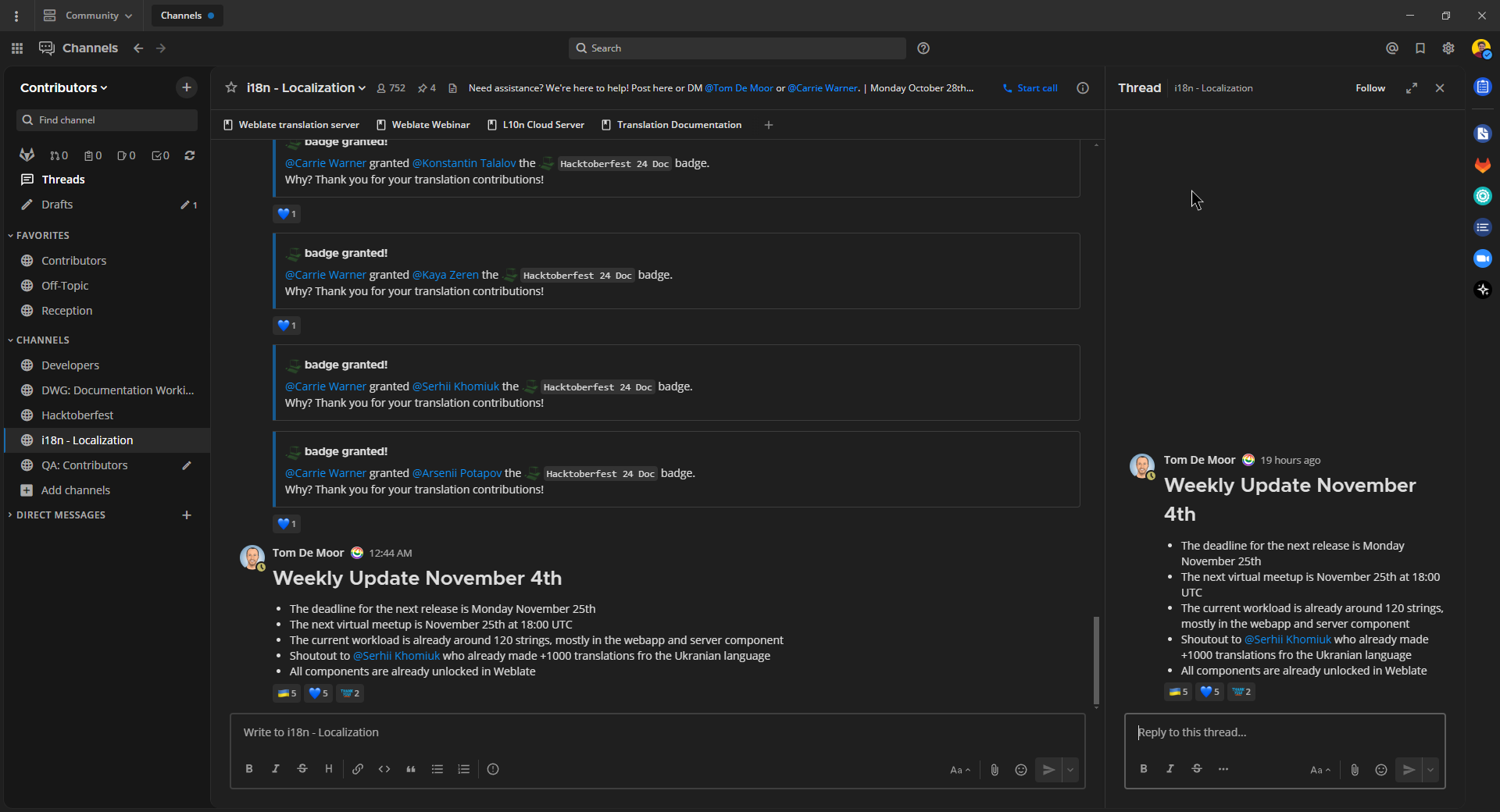
이 테마를 원하시나요? 다음 코드를 Mattermost에 복사하여 붙여넣으세요:
{"sidebarBg":"#171717","sidebarText":"#ffffff","sidebarUnreadText":"#ffffff","sidebarTextHoverBg":"#302e30","sidebarTextActiveBorder":"#196caf","sidebarTextActiveColor":"#ffffff","sidebarHeaderBg":"#1f1f1f","sidebarTeamBarBg":"#181818","sidebarHeaderTextColor":"#ffffff","onlineIndicator":"#399fff","awayIndicator":"#c1b966","dndIndicator":"#e81023","mentionBg":"#0177e7","mentionColor":"#ffffff","centerChannelBg":"#1f1f1f","centerChannelColor":"#dddddd","newMessageSeparator":"#cc992d","linkColor":"#0d93ff","buttonBg":"#0177e7","buttonColor":"#ffffff","errorTextColor":"#ff6461","mentionHighlightBg":"#784098","mentionHighlightLink":"#a4ffeb","codeTheme":"monokai"}
GitHub 테마#
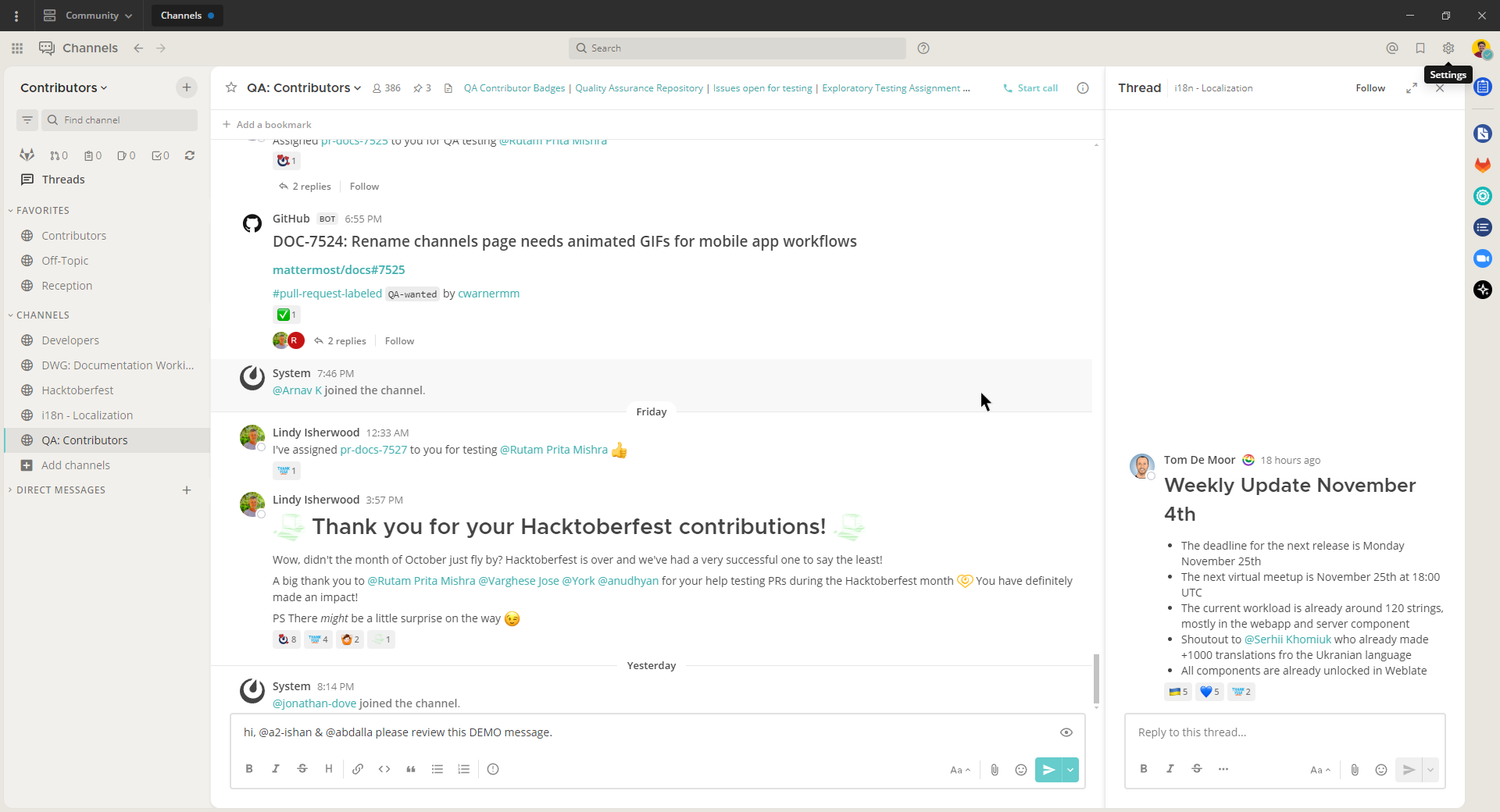
이 테마를 원하시나요? 다음 코드를 Mattermost에 복사하여 붙여넣으세요:
{"awayIndicator":"#D4B579","buttonBg":"#66CCCC","buttonColor":"#FFFFFF","centerChannelBg":"#FFFFFF","centerChannelColor":"#444444","codeTheme":"github","linkColor":"#3DADAD","mentionBg":"#66CCCC","mentionColor":"#FFFFFF","mentionHighlightBg":"#3DADAD","mentionHighlightLink":"#FFFFFF","newMessageSeparator":"#F2777A","onlineIndicator":"#52ADAD","sidebarBg":"#F2F0EC","sidebarHeaderBg":"#E8E6DF","sidebarHeaderTextColor":"#424242","sidebarText":"#2E2E2E","sidebarTextActiveBorder":"#66CCCC","sidebarTextActiveColor":"#594545","sidebarTextHoverBg":"#E0E0E0","sidebarUnreadText":"#515151"}
Monokai 테마#
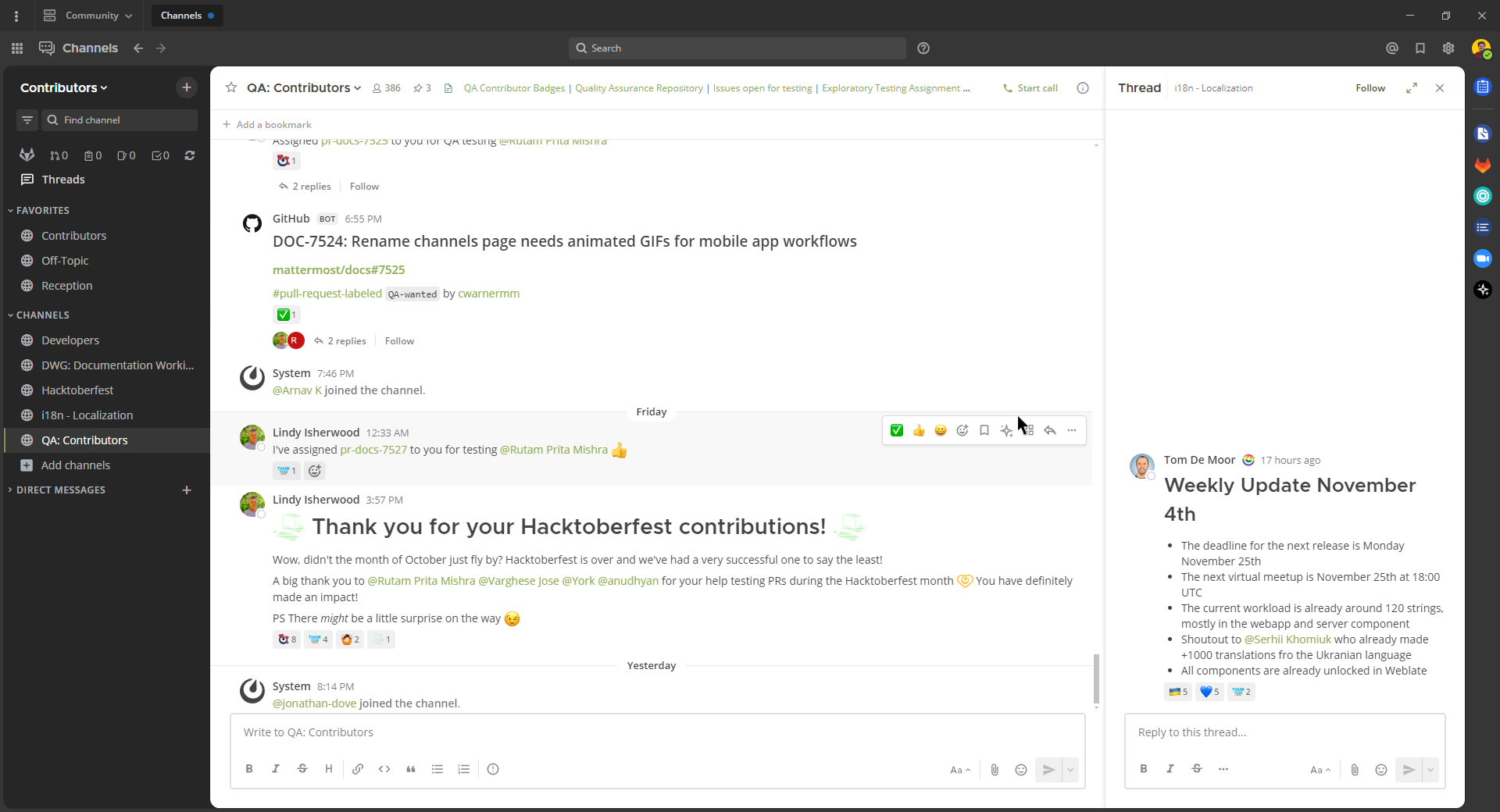
이 테마를 원하시나요? 다음 코드를 Mattermost에 복사하여 붙여넣으세요:
{"awayIndicator":"#B8B884","buttonBg":"#90AD58","buttonColor":"#FFFFFF","centerChannelBg":"#FFFFFF","centerChannelColor":"#444444","codeTheme":"monokai","linkColor":"#90AD58","mentionBg":"#7E9949","mentionColor":"#FFFFFF","mentionHighlightBg":"#54850C","mentionHighlightLink":"#FFFFFF","newMessageSeparator":"#90AD58","onlineIndicator":"#99CB3F","sidebarBg":"#262626","sidebarHeaderBg":"#363636","sidebarHeaderTextColor":"#FFFFFF","sidebarText":"#FFFFFF","sidebarTextActiveBorder":"#7E9949","sidebarTextActiveColor":"#FFFFFF","sidebarTextHoverBg":"#525252","sidebarUnreadText":"#CCCCCC"}
Solarized 다크 테마#
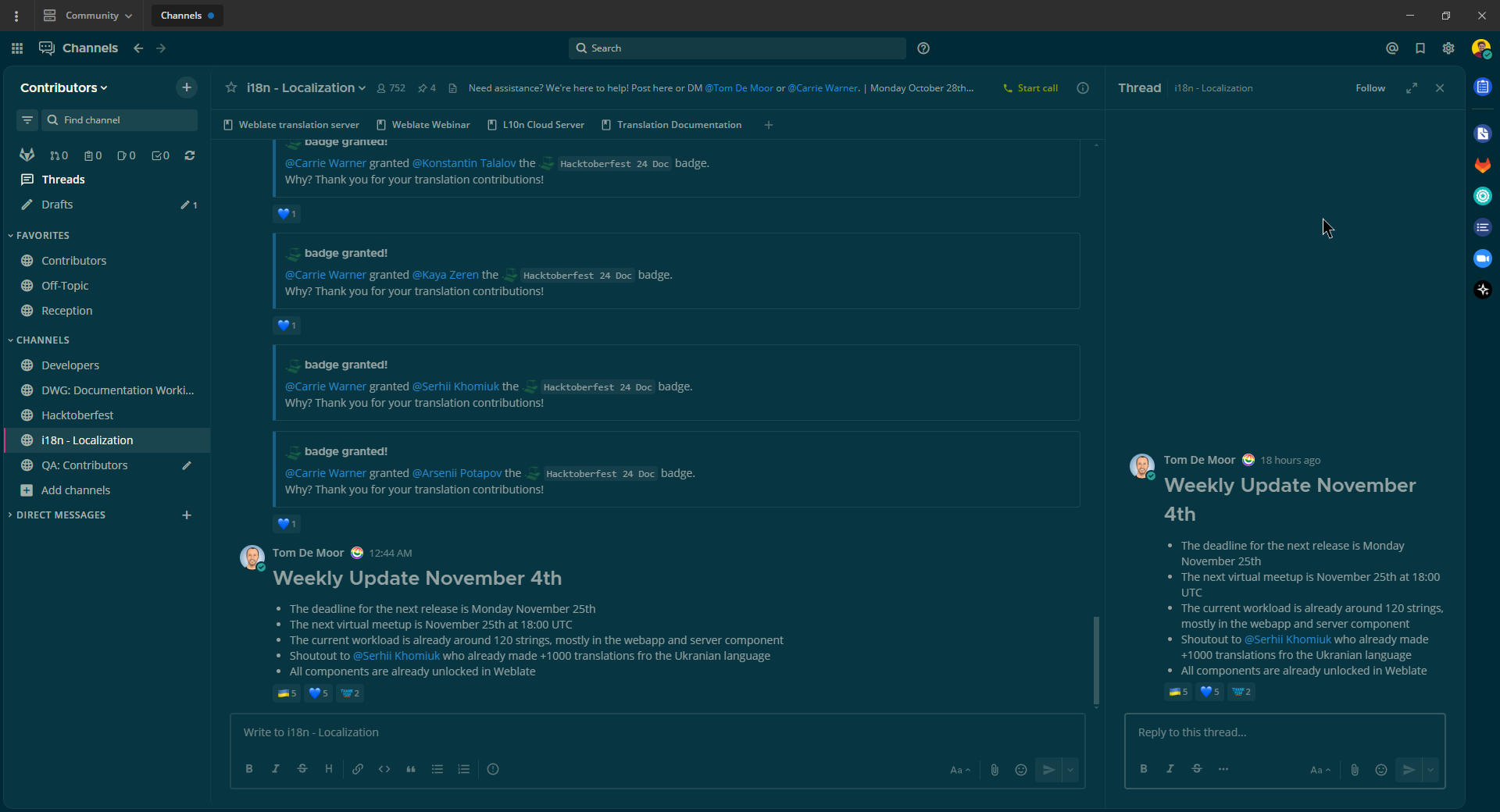
이 테마를 원하시나요? 다음 코드를 Mattermost에 복사하여 붙여넣으세요:
{"awayIndicator":"#E0B333","buttonBg":"#859900","buttonColor":"#fdf6e3","centerChannelBg":"#073642","centerChannelColor":"#93a1a1","codeTheme":"solarized-dark","linkColor":"#268bd2","mentionBg":"#dc322f","mentionColor":"#ffffff","mentionHighlightBg":"#d33682","mentionHighlightLink":"#268bd2","newMessageSeparator":"#cb4b16","onlineIndicator":"#2AA198","sidebarBg":"#073642","sidebarHeaderBg":"#002B36","sidebarHeaderTextColor":"#FDF6E3","sidebarText":"#FDF6E3","sidebarTextActiveBorder":"#d33682","sidebarTextActiveColor":"#FDF6E3","sidebarTextHoverBg":"#CB4B16","sidebarUnreadText":"#FDF6E3","errorTextColor":"#dc322f"}
Gruvbox 다크 테마#
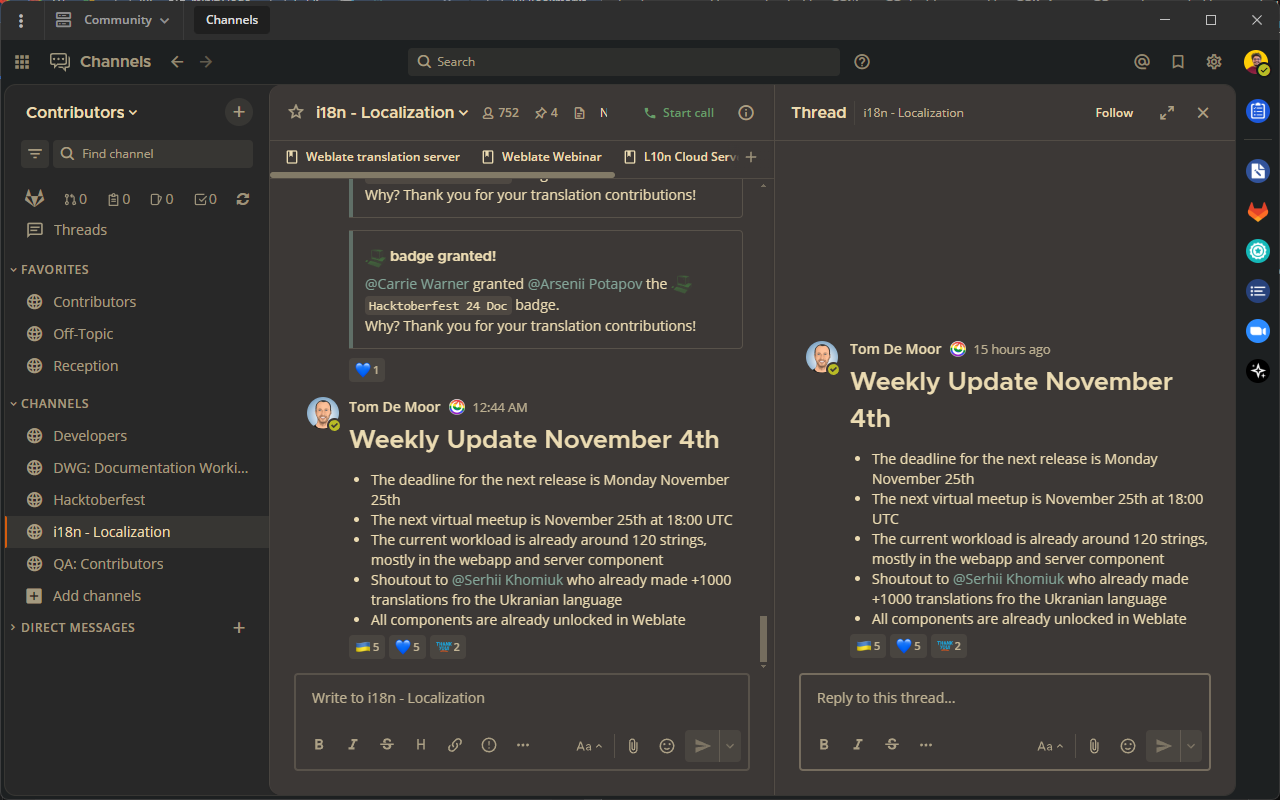
이 테마를 원하시나요? 다음 코드를 Mattermost에 복사하여 붙여넣으세요:
{"awayIndicator":"#fabd2f","buttonBg":"#689d6a","buttonColor":"#ebdbb2","centerChannelBg":"#3c3836","centerChannelColor":"#ebdbb2","codeTheme":"monokai","errorTextColor":"#fb4934","linkColor":"#83a598","mentionBg":"#b16286","mentionColor":"#fbf1c7","mentionHighlightBg":"#d65d0e","mentionHighlightLink":"#fbf1c7","newMessageSeparator":"#d65d0e","onlineIndicator":"#b8bb26","sidebarBg":"#282828","sidebarHeaderBg":"#1d2021","sidebarHeaderTextColor":"#ebdbb2","sidebarText":"#ebdbb2","sidebarTextActiveBorder":"#d65d0e","sidebarTextActiveColor":"#fbf1c7","sidebarTextHoverBg":"#d65d0e","sidebarUnreadText":"#fe8019"}
One 다크 테마#
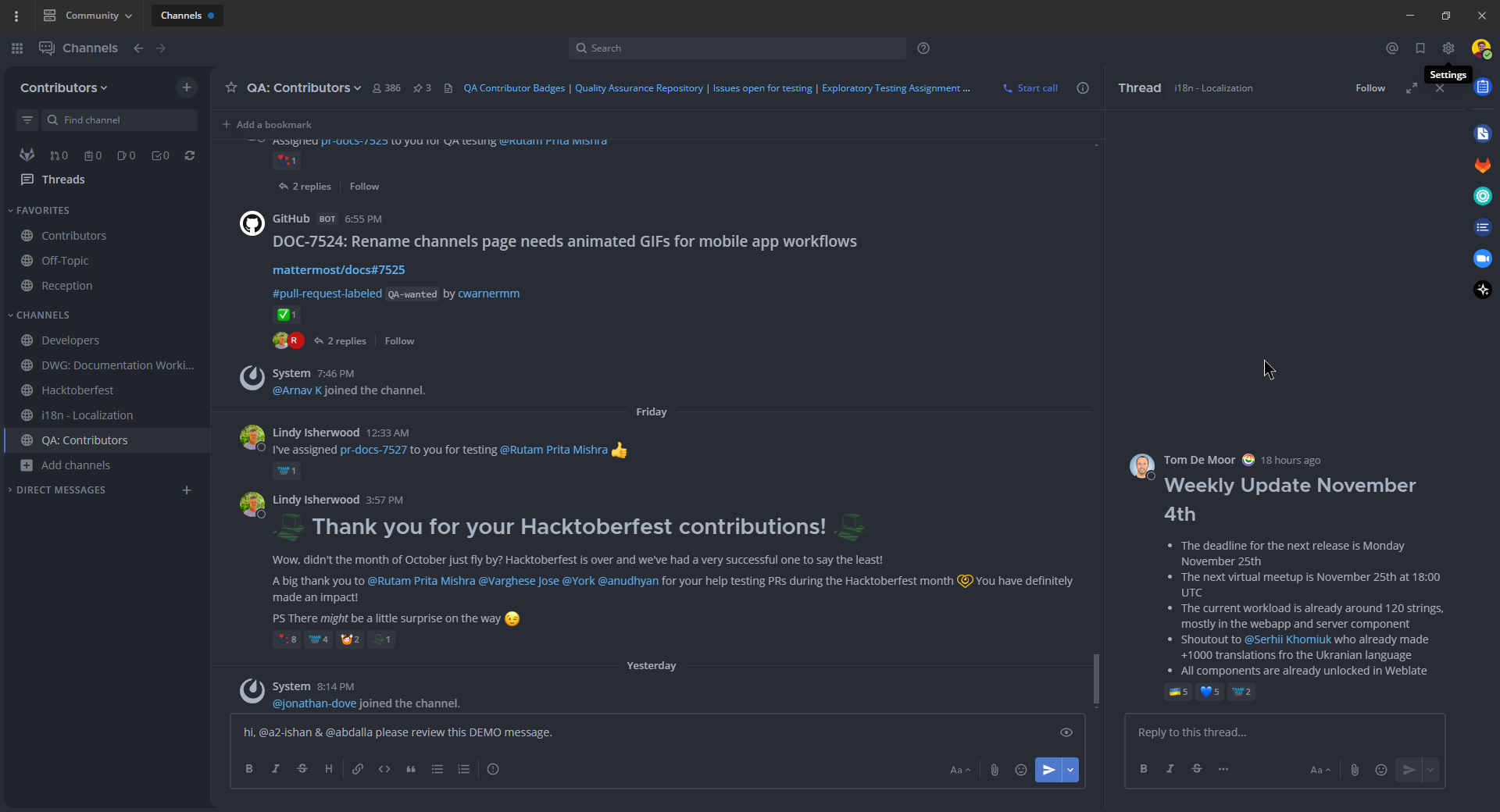
one-dark-mattermost GitHub 저장소를 온라인에서 방문하세요:.
이 테마를 원하시나요? 다음 코드를 Mattermost에 복사하여 붙여넣으세요:
{"sidebarBg":"#21252b","sidebarText":"#abb2bf","sidebarUnreadText":"#abb2bf","sidebarTextHoverBg":"#3a3f4b","sidebarTextActiveBorder":"#4d78cc","sidebarTextActiveColor":"#d7dae0","sidebarHeaderBg":"#282c34","sidebarHeaderTextColor":"#abb2bf","onlineIndicator":"#98c379","awayIndicator":"#d19a66","dndIndicator":"#be5046","mentionBg":"#98c379","mentionColor":"#ffffff","centerChannelBg":"#282c34","centerChannelColor":"#abb2bf","newMessageSeparator":"#c67add","linkColor":"#61afef","buttonBg":"#4d78cc","buttonColor":"#ffffff","errorTextColor":"#f44747","mentionHighlightBg":"#525a69","mentionHighlightLink":"#61afef","codeTheme":"monokai","mentionBg":"#98c379"}
Discord 다크 테마 (신규)#
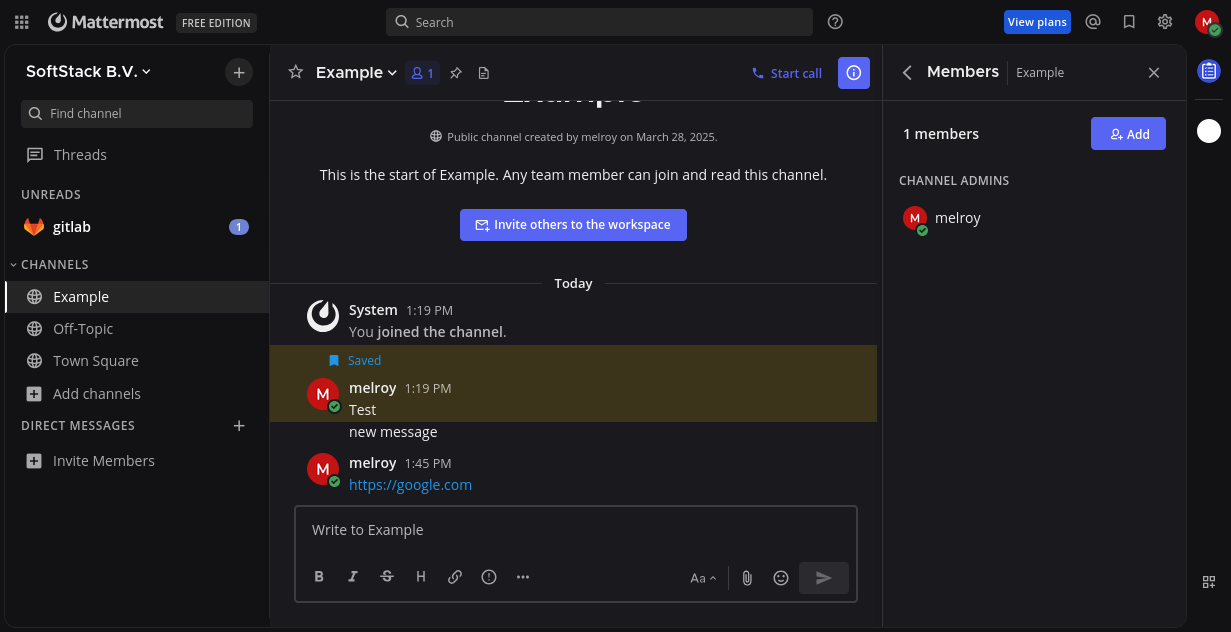
mattermost-discord-dark GitHub 저장소를 온라인에서 방문하세요:.
이 테마를 원하시나요? 다음 코드를 Mattermost에 복사하여 붙여넣으세요:
{"sidebarBg": "#121214", "sidebarText": "#ffffff", "sidebarUnreadText": "#ffffff", "sidebarTextHoverBg": "#1d1d1e", "sidebarTextActiveBorder": "#ffffff", "sidebarTextActiveColor": "#ffffff", "sidebarHeaderBg": "#121214", "sidebarHeaderTextColor": "#ffffff", "sidebarTeamBarBg": "#121214", "onlineIndicator": "#43a25a", "awayIndicator": "#ca9654", "dndIndicator": "#d83a42", "mentionBg": "#6e84d2", "mentionBj": "#6e84d2", "mentionColor": "#ffffff", "centerChannelBg": "#1a1a1e", "centerChannelColor": "#efeff0", "newMessageSeparator": "#ff4d4d", "linkColor": "#2095e8", "buttonBg": "#5865f2", "buttonColor": "#ffffff", "errorTextColor": "#ff6461", "mentionHighlightBg": "#a4850f", "mentionHighlightLink": "#a4850f", "codeTheme": "monokai"}
Discord 다크 테마 (구버전)#
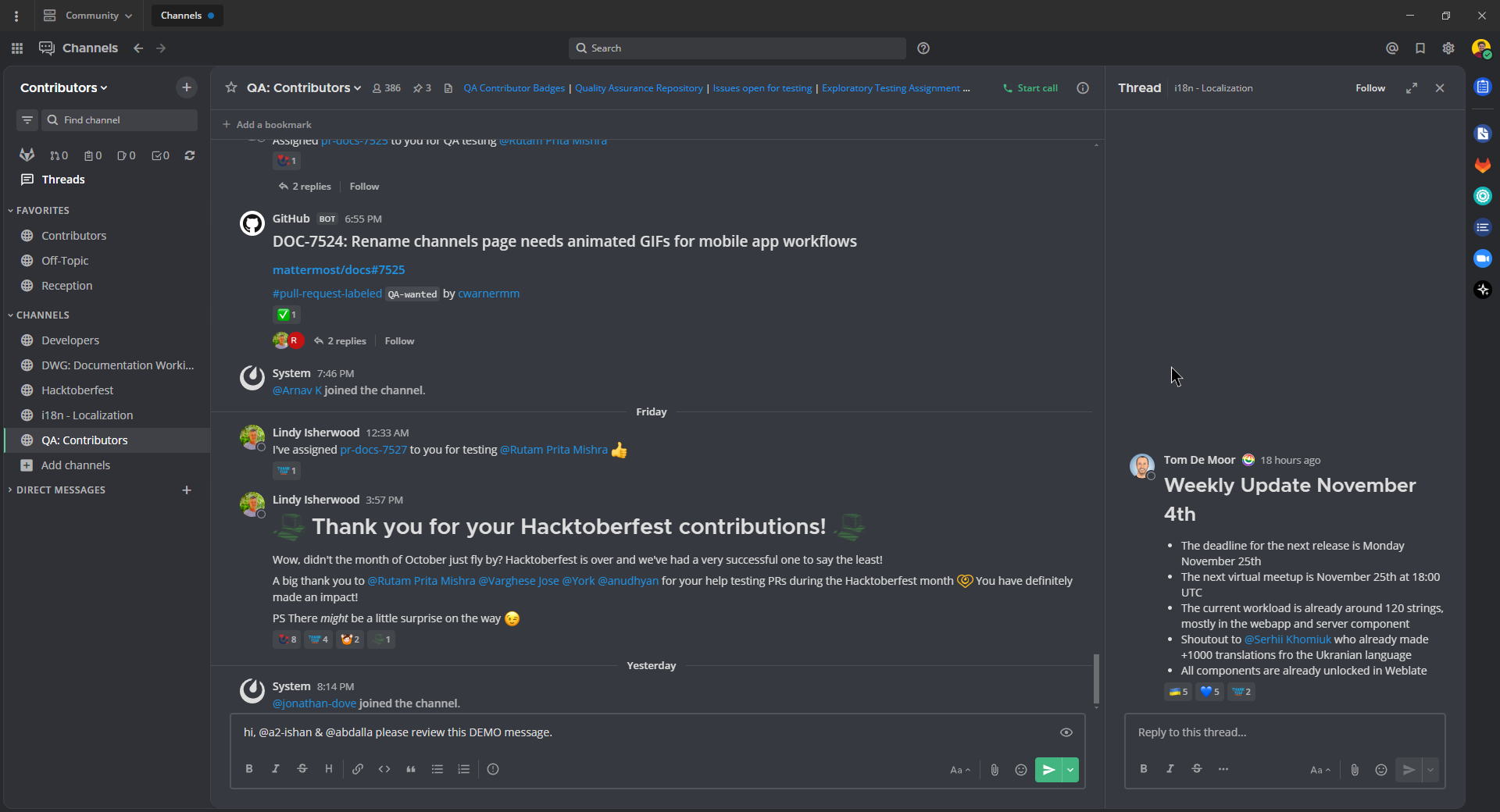
mattermost-discord-dark-old GitHub 저장소를 온라인에서 방문하세요:
이 테마를 원하시나요? 다음 코드를 Mattermost에 복사하여 붙여넣으세요:
{"sidebarBg":"#2f3136","sidebarText":"#ffffff","sidebarUnreadText":"#ffffff","sidebarTextHoverBg":"#33363c","sidebarTextActiveBorder":"#66cfa0","sidebarTextActiveColor":"#ffffff","sidebarHeaderBg":"#27292c","sidebarHeaderTextColor":"#ffffff","onlineIndicator":"#43b581","awayIndicator":"#faa61a","dndIndicator":"#f04747","mentionBg":"#6e84d2","mentionBg":"#6e84d2","mentionColor":"#ffffff","centerChannelBg":"#36393f","centerChannelColor":"#dddddd","newMessageSeparator":"#6e84d2","linkColor":"#2095e8","buttonBg":"#43b581","buttonColor":"#ffffff","errorTextColor":"#ff6461","mentionHighlightBg":"#3d414f","mentionHighlightLink":"#6e84d2","codeTheme":"monokai"}
Night Owl 다크 테마#
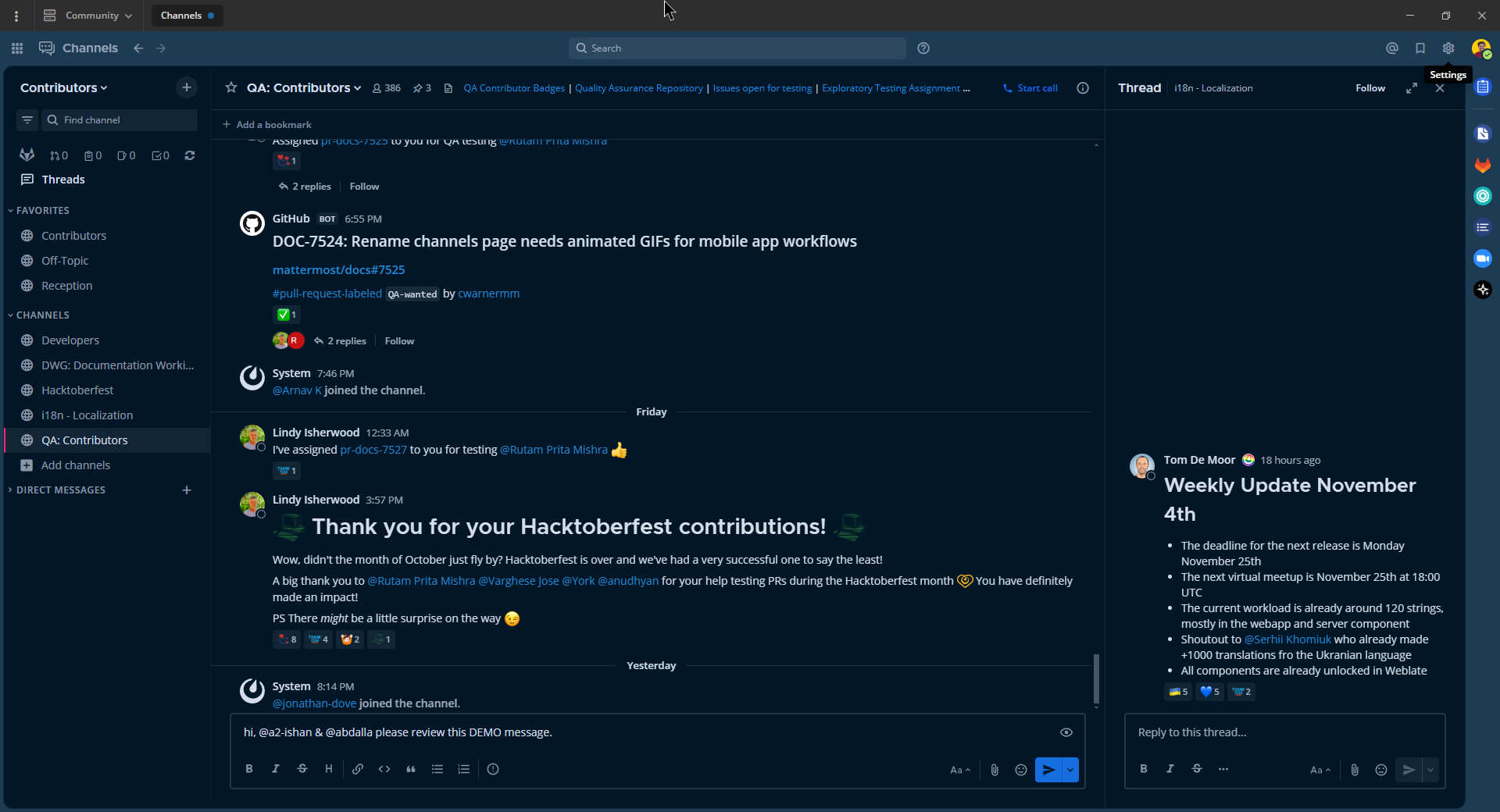
이 테마를 원하시나요? 다음 코드를 Mattermost에 복사하여 붙여넣으세요:
{"sidebarBg":"#011627","sidebarText":"#d6deeb","sidebarUnreadText":"#d6deeb","sidebarTextHoverBg":"#1d3b53","sidebarTextActiveBorder":"#ff2c83","sidebarTextActiveColor":"#82aaff","sidebarHeaderBg":"#1d3b53","sidebarHeaderTextColor":"#d6deeb","onlineIndicator":"#addb67","awayIndicator":"#ffbc42","dndIndicator":"#f74343","mentionBg":"#d6deeb","mentionBg":"#d6deeb","mentionColor":"#145dbf","centerChannelBg":"#011627","centerChannelColor":"#d6deeb","newMessageSeparator":"#ff8800","linkColor":"#2389d7","buttonBg":"#166de0","buttonColor":"#011627","errorTextColor":"#fd5960","mentionHighlightBg":"#0b2942","mentionHighlightLink":"#82aaff","codeTheme":"solarized-dark"}
다크 테마 (데스크톱 앱 전용)#
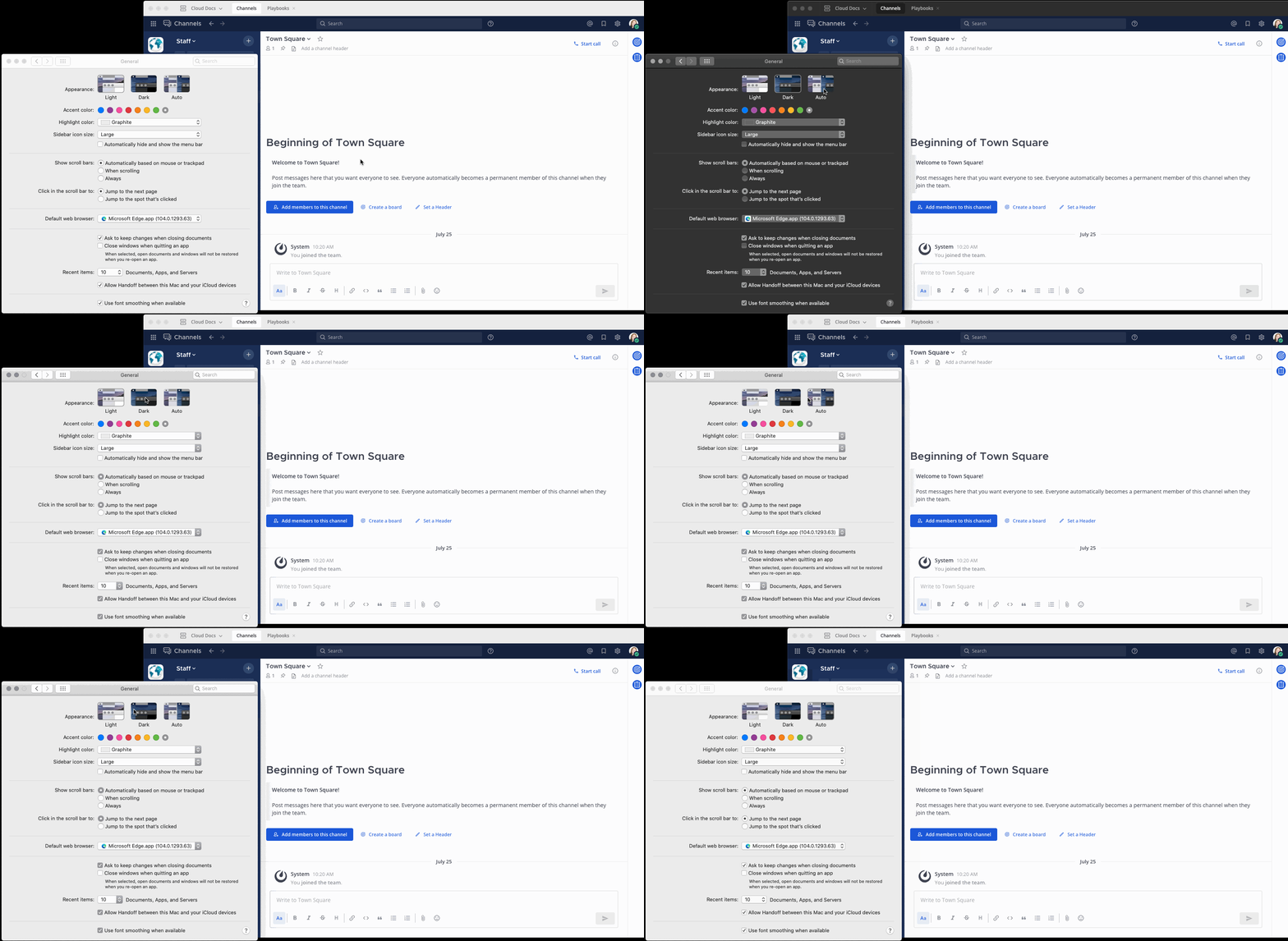
Windows와 macOS에서는 컴퓨터에 설정한 시스템 표시 환경설정(예: 라이트 모드 또는 다크 모드)이 Mattermost 데스크톱 앱에도 적용됩니다. Linux에서는 보기 메뉴를 통해 수동으로 관리하세요.
사용자 지정 테마 내보내기#
사용자 지정 테마 메뉴에서 테마 값을 복사하여 Mattermost에서 테마를 내보냅니다.
사용자 지정 테마 가져오기#
사용자 지정 테마 메뉴에 테마 값을 붙여넣어 Mattermost에 테마를 가져옵니다. 기존 테마 값을 복사한 다음 테마 색상 공유를 위해 복사하여 붙여넣기 필드에 테마 값을 붙여넣습니다. 테마 변경 사항을 확인하려면 저장 을 선택하세요.
중앙 채널 스타일#
아래와 같이 Mattermost 테마의 모든 측면을 사용자 지정할 수 있습니다:
- 중앙 채널 배경
중앙 창, 오른쪽 사이드바 및 모든 대화 창 배경의 색상입니다.
- 중앙 채널 텍스트
멘션, 링크, 해시태그 및 코드 블록을 제외한 중앙 창, 오른쪽 사이드바 및 대화 상자의 모든 텍스트 색상입니다.
- 새 메시지 구분선
읽지 않은 메시지가 있는 채널로 이동할 때 마지막으로 읽은 메시지 아래에 새 메시지 구분선이 나타납니다.
- 오류 텍스트 색상
모든 오류 텍스트의 색상입니다.
- 멘션 강조 배경
중앙 창과 오른쪽 사이드바에서 멘션을 트리거하는 단어 뒤의 강조 색상입니다.
- Mention Highlight Link
중앙 창과 오른쪽 사이드바에서 멘션을 트리거하는 단어의 텍스트 색상입니다.
- 코드 테마
모든 코드 블록의 배경 및 구문 색상입니다.